02 — Miagen 2.0 · B2B / Information Architecture / Complex Products
Making complex financial solutions easier to understand.
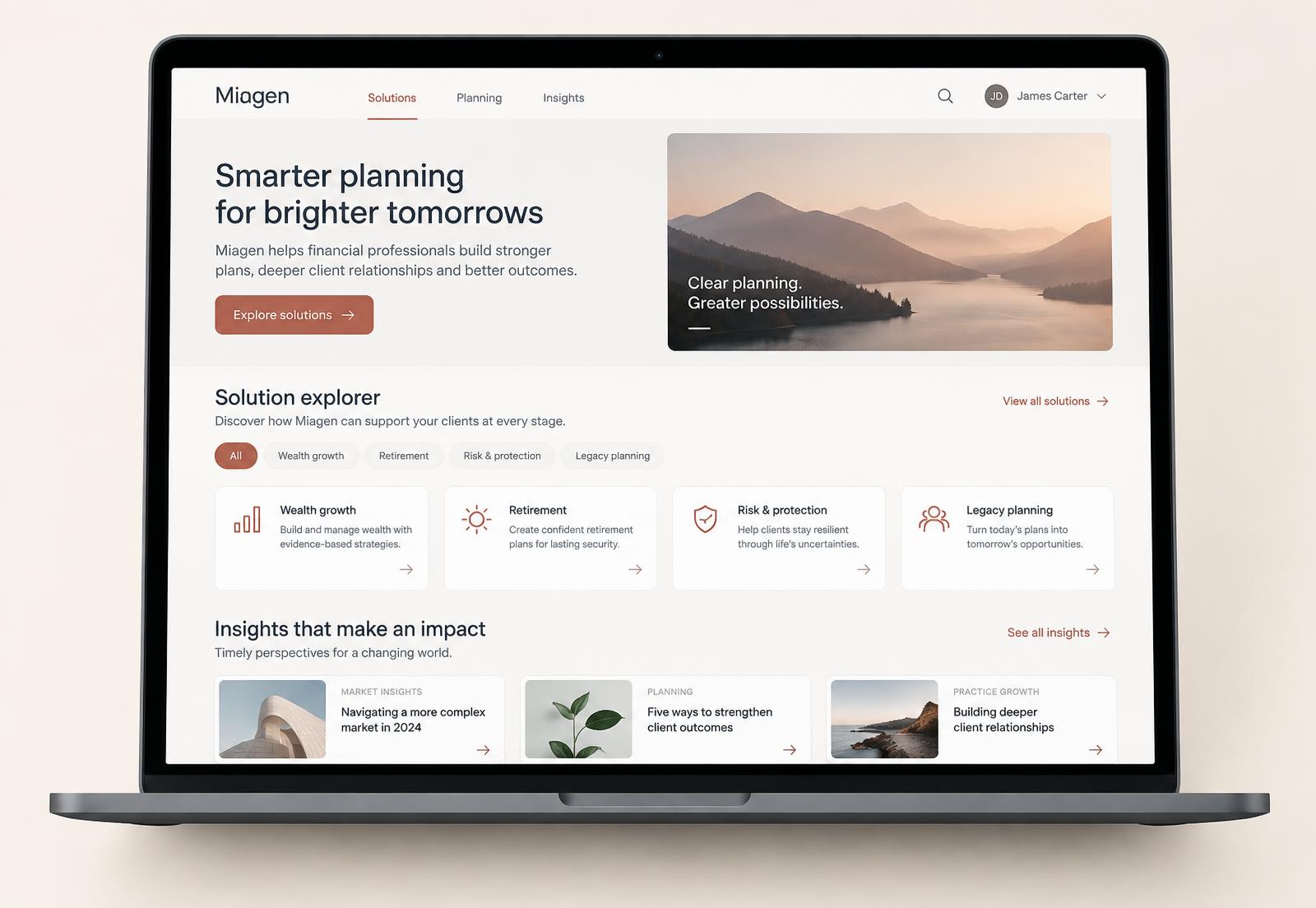
Redesigning Miagen's digital experience to help businesses understand complex planning and financial solutions through clearer information architecture and interactive experiences.
Role
Product Designer — information architecture, interaction design, UI, prototyping
Team
Product, marketing and engineering stakeholders
Tools
Figma, FigJam, Notion, Jira
What I did
- Restructured the content and navigation around what businesses were actually trying to find out
- Designed interactive modules that let people explore a solution instead of reading about it
- Built the component library and page patterns the team could keep extending
- Prototyped the main journeys and walked stakeholders through them before build
Overview
Miagen sells planning and financial solutions that are genuinely complicated. The products are technical, the audience is made up of businesses at different levels of familiarity, and the existing experience asked people to read a lot before they understood anything.
The brief was to redesign the digital experience. The real work was information architecture: deciding what a business needs to know first, what can wait, and how to let someone explore a complex offering at their own pace.
The problem
- The offering was structured the way the business was organised internally, not the way a prospective client thinks about their own problem.
- Dense explanatory copy carried the entire load, so everything looked equally important and nothing stood out.
- There was no way to compare solutions or see how one applied to a particular situation.
- Different teams added content over time without a shared structure to add it into.
How I worked through it
- 01
Understand the business and the audience
Worked with internal stakeholders to map what each solution actually does, who it is for, and the questions people ask before they get in touch.
- 02
Rebuild the architecture
Reorganised the content into a structure based on the outcome someone is looking for, then tested that structure with the people who talk to clients every day.
- 03
Design for exploration
Replaced long explanatory passages with interactive modules and progressive layers of detail, so someone can go as deep as they need to and stop when they have their answer.
- 04
Make it extendable
Designed reusable page and module patterns in Figma so new solutions could be added later without the structure falling apart again.
Design decisions, and why
Organise around the problem being solved, not the internal product taxonomy.
WhyPeople arrive with a situation, not with the name of the solution they need.
Layer detail instead of front-loading it.
WhyThe same page has to work for someone scanning for relevance and someone doing due diligence.
Turn static explanation into interactive modules.
WhyComplex ideas land faster when you can move through them yourself than when you read a description of them.
Keep one consistent module system across the site.
WhyThe content will keep growing. A repeatable pattern is the only thing that survives that.
Reflection
The hardest part of this project was not visual. It was getting agreement internally on a structure that put the client's question first, ahead of how the business describes itself.
If I did it again I would spend more time upfront with the people who handle enquiries. Their inbox is the most honest map of what the audience does not understand.