03 — Insightful Forms · SaaS / Dashboard / Data Visualization
Turning employee feedback into actionable insights.
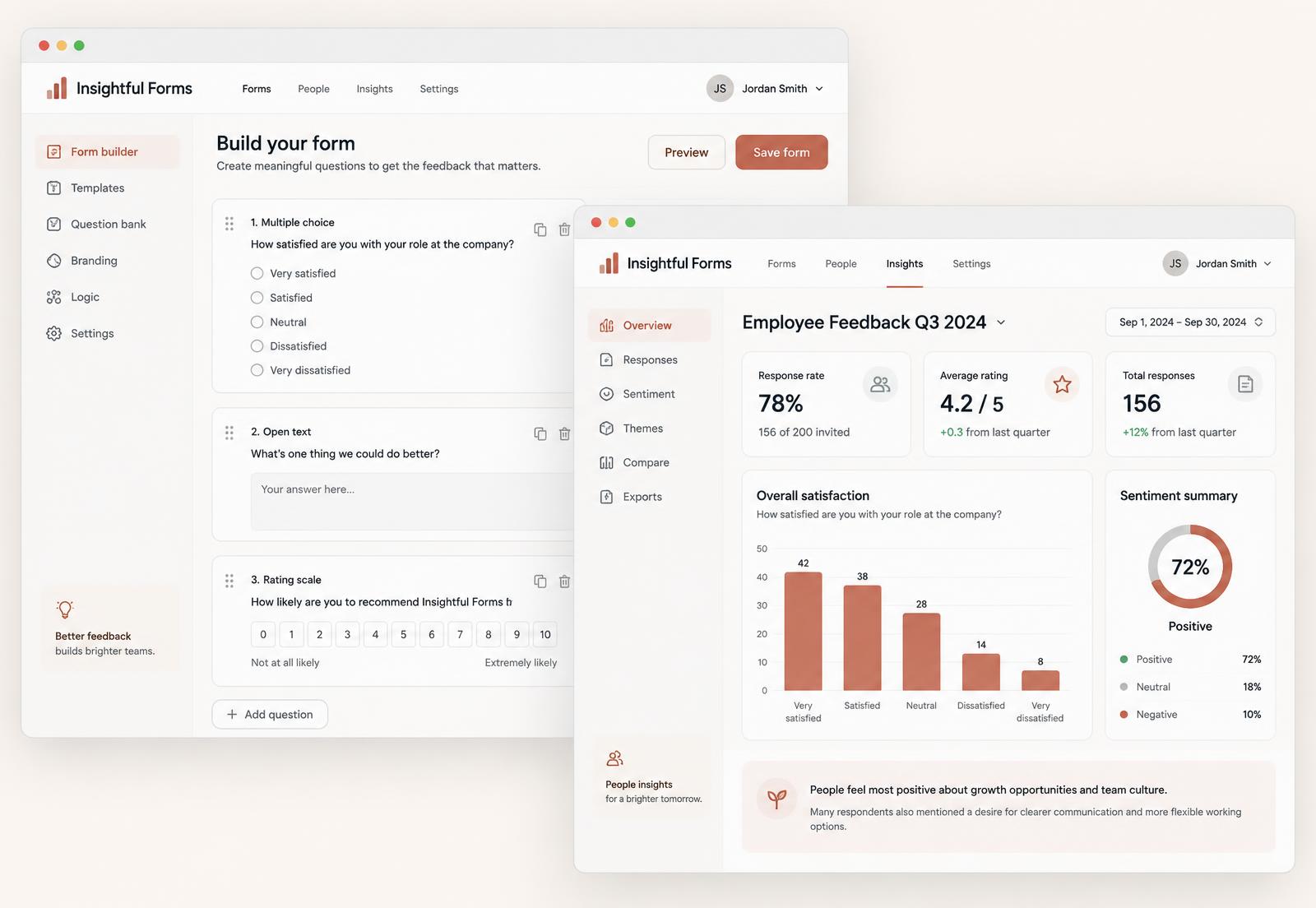
Designing a feedback platform that makes it easier to create personalized forms, understand responses and turn employee feedback into useful decisions.
Role
Product Designer — research, interaction design, UI, data visualisation, prototyping
Team
Product and engineering
Tools
Figma, FigJam, Google Forms, Notion
What I did
- Ran competitive research across existing form and survey tools
- Interviewed users to understand how feedback is collected and what happens to it afterwards
- Designed the form creation flow and the insights dashboard
- Chose the chart types and dashboard structure, then iterated them with the team
Overview
Insightful Forms is a feedback platform for teams. People can build personalised forms, collect responses, and see what those responses mean in one place.
Most tools in this space are good at collecting and poor at interpreting. You end up with a spreadsheet and no decision. That gap was the product opportunity.
Research
I looked at the tools people already use, then spoke to users about how they actually run a feedback cycle: what they ask, how they share it, and what they do with the results.
What came up
- Building a form was fine. Making sense of the responses was where people got stuck.
- Raw response lists were exported and analysed elsewhere, which meant the analysis lived outside the tool.
- People wanted to compare results over time, not just look at one round in isolation.
- Personalising a form for different teams or groups was more work than it needed to be.
Product opportunities
- Make the insight the destination, not the response list.
- Reduce the effort of creating and personalising a form so more feedback actually gets collected.
- Show change over time by default, because a single number rarely tells anyone what to do.
- Keep the analysis inside the product so decisions are made where the data lives.
Design decisions, and why
The dashboard opens on a summary, not on raw responses.
WhyThe first question is always what the feedback is telling us overall.
A small, deliberate set of chart types, used consistently.
WhyConsistency makes a dashboard readable. Variety makes it look busy and slows people down.
Question blocks in the builder, reorderable and reusable.
WhyMost forms are variations of an earlier one, so building should start from something rather than nothing.
Every summary drills down into the responses behind it.
WhyAggregates build the picture, but people need the individual answers to trust it and to act.
Iteration
The first dashboard tried to show everything at once. It looked impressive and answered nothing. I cut it back to a small number of things the user asked for most, moved the rest behind a deliberate step, and the screen started doing its job.
Reflection
Designing data views taught me to start from the question the person is holding, then choose the chart. Starting from the chart is how dashboards get crowded.
I would build in a way to act on an insight directly, rather than sending people elsewhere once they have understood something.